Showing posts with label Samsung Gear 360. Show all posts

Wednesday, November 28, 2018

Samsung Gear 360 Real 360° High Resolution VR Camera (2016 version)


Samsung Gear 360 Real 360° High Resolution VR Camera

support page

360 photo album

my sample videos

I bought the older version because the image sensor has twice the pixels and uses them when taking pics to produce a 30 MP image which rivals anything I've seen so far under $700.

First issue was just getting it. I found one for just $72 but they kept extending the ship date. I finally just cancelled and ordered from a different seller for $20 more.

Next after getting it I found it would not work with my phone. I could swear that when I originally ordered it it said it worked with a Samsung Note 4 but after receiving it and finding it would not I went back and checked and only Note 5 and newer Samsungs were listed. To see if your phone is supported try installing the Samsung Gear 360 (New) app. But no worries there is a remote you can buy right?  The Aobelieve Bluetooth Remote Shutter for Samsung Gear 360 2016 and 2017 Edition Camera which works well. For remotely pushing the record button anyway which is the main thing. It was $3 off with 2 day shipping so I went ahead and got it even before I saw what kind of pics I was going to get.

While waiting on the remote I took a couple test shots to try out the software. Unfortunately like the Mokacam it appears you might not be able to get the software any more.  The site you download software for Samsung cameras from has been down for a week at this point of this writing. The camera outputs photos and video in the dual fisheye format like the Mokacam 360. I gather if you have one of the few models this and the newer model cam are supposed to work with the phone converts (stitches) it to the postable standard equirectangular projection format the newer / better cams output.  Googling I did not find a lot of options either. AutoPano has closed its doors so you can not even buy it though the site is still up. I looked on Alternatives. I tried a few but unfortunately most seem to want separate files they can stitch into a panorama, not a 360 sphere. PTGui is suppose to convert the dual fisheye directly. I downloaded the trial and tried several options but none came out right. Finally found a way to convert the photos at least. A free online service called nadirpatch.com. Though the seams are pretty obvious, if the angle is right you might hide them. See 360 photo album. So I still need a better solution or the camera is one step away from useless. In several places Samsung refers to the software as CyberLink ActionDirector so I went to CyberLink. There it shows ActionDirector is for video and PhotoDirector is for photos so I downloaded a trial of that from them. (After having to create a new account before I could run the software because they seem to think my password changed at some point since 2011.)  But again that does not seem to work with 360 files. So back I went for ActionDirector which seems to require an account to even download the trial. While it appears it is not the same as the Samsung version it does appear to be using it as a base. This video shows how you are supposed to use the Samsung version to convert / stitch the videos but the CyberLink version says the files are corrupt and will not even open them. This post shows how ActionDirector should also convert / stitch your photos as well but the CyberLink version just imports them as is. What it does seem to do is let you view them as 360 pics but with worse stitching than the nadirpatch.com option. Compare the screengrab here.
With the nadirpatch.com stitched version on Flikr. And this still does not get you to something postable.

I was about to just give up on this when I stumbled upon a post from 2010 in a CNet forum that says the hostname has changed to downloadcenter.samsung.com.  This camera came out out in 2016 they were using the wrong host name for download links a good 6 years after it changed and they are still wrong today! This is the link to download the Samsung ActionDirector software.

So I got the Samsung software installed. Note it is so close the the stock Cyberlink version that you have to close the Cyberlink version to install it.  After registering it hung trying to import sample media. Restarting again I selected a new 360 VR Video project

That let me import the pics but only if I have not edited them in Photoshop. As you can see here the 2 I increased the contrast on failed to convert on import though nadirpatch.com did. It is not obvious but ActionDirector converts on import and sticks them in the export directory. You need to right click on the files to open the folder to see them if you are not sure where that folder is.
On the plus side the ones it converted do look better than when converted with nadirpatch.com. And I was able to convert some sample videos. Though the videos are not great. Full screen even on a 27 inch monitor they pretty pixelated. Especially when the cam is moving. But then like I said at the start I was mainly interested in the 30 MP photos since I was already disappointed in the video Kodak PIXPRO SP360 4K Dual Pro Pack VR Camera which was about twice the vertical and horizontal resolution of the Samsung. You will notice they both suffer from a shallow depth of field and focus fixed about 10 feet from the lens. The photo resolution and quality are pretty much the same though.  The Kodak was $850 when I bought (and then returned) it back in 2016. It is going the $350 now. Which is what the Samsung was going for back in 2016.

I added some sunset and indoor sample pics to my Samsung Gear 360 album

Editing is non standard. To edit the pics read Now you can edit 360 photos in Photoshop … here's how

Monday, October 22, 2018

Mokacam 360

I've added a Youtube playlist of my 360 cam videos

Draft 5/14/2018


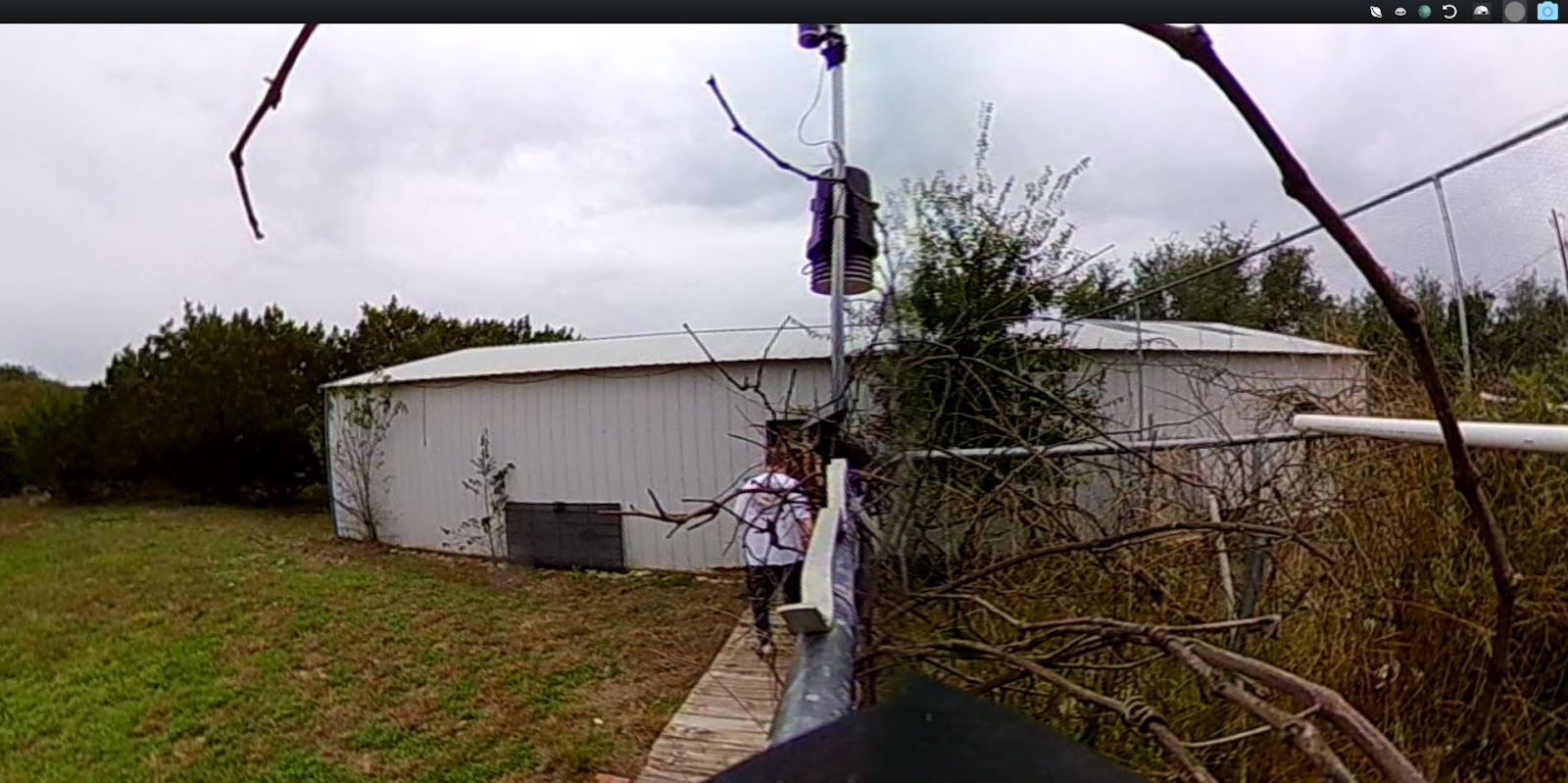
Well my Mokacam 360 FINALLY showed up over a year after the scheduled ship date. Still waiting for the accessory kit as of 5/14/2018. It also appears to be a Vivitar DVR988-BLK 360 Action Camera, which is getting equally bad reviews. with a metal plate front and back to cover it. Maybe to hid the name? The Vivitar is the same price and also claims to be high rez but only does video at 960p. This pic gives you an idea of the quality. Note stills are 3008 by 1504.

You even have to convert the video and pictures so anything sees them as 360 after getting them off the camera. Note you still need 360 support to view them as 360 so this does not appear as 360 here.
I'll use at the next show but probably not going to be worth the bother after that. Might be worth using for valley shots if the remote ever gets here. (See update below for how bad that went.)

The Mokacam 360 is a disappointment on many levels.
First off it was over a year late shipping.
When it did get here the app did not work at all. Fortunately the Vivitar app does though it seems to lose connection a lot even a couple feet from the camera.
The video is really poor but then it is only doing 960 X 960 on each lens despite it obviously having 1504 x 1504 sensors. I can only imagine for image stabilization though there is not mention of this. But it you think about it there really is not much you can do with that low of resolution.
This is a nice explanation of relative resolutions Now think about your average cheap 720p (1280x720) security cam that has a horizontal viewing angle of around 70 degrees and you still can not really make out anything of any distance on them. They are OK on a small screen and for seeing things close, like a Ring Doorbell for instance. That is 1280 pixels over 70 degrees or about 18 pixels per degree. This is 960 pixels over more than 180 degrees so you are talking 4 to 5 pixels per degree. So just to match the video quality of that cheap 720p camera you really need 3240 x 3240 pixels. 4K will get you there on the horizontal but not the vertical. And that is just one side. You really need about 12K video to pull off the same level of quality in full 360 x 360 you would get from 720p.

Note on their Indiegogo page they claim 30fps@2K and infer that is the same as the Samsung Gear 360 but it is not. Note too the Samsung Gear 360 (2017 Edition) Real 360° 4K VR Camera (US Version with Warranty)  has an MSRP of $229, is going for $89 with one day free shipping (on 10/22/2018) and the price seems to be on a downward trend. The reported record resolution for the Samsung is 4096x2048 @ 24fps 360° Video/15MP 360° pictures. Just goes to show how shipping late blows your market. There is also the GoPro Fusion — 360 Waterproof Digital VR Camera with Spherical 5.2K HD Video 18MP Photos which sounds like it is a bit better but at $600 it might not be worth it. You also might want to look at this page for other options.


Update 10/22/2018

I did get my accessory pack a week or so later and managed to get a quick test video done on the 3rd try that was stitched correctly but then forgot how I did it when I had some show footage to try it on. (See further on.)  So I left this post on hold. I used the Mokacam 360 again at a show a couple weeks ago and thought I'd take another shot at it.

I was making another go at it today and decided to go looking to see if any updates or advice had been posted. I ended up posting my frustration (see below) the projects Indiegogo page. Where it seems they are still failing to fulfill orders:
The post: Anyone ever got this thing to record in higher than 1920 by 960? Or found any settings other that record mode? Checked site for new firmware but there appears to be apps, firmware and manual for only one of their 4 models and this cam is not it. Only other thing on support page is “Forum under maintenance”. Website is so painfully slow it appears to be on the verge of crashing. Of the 2 Mokacam apps in the Google store only one sees the camera and it says it is the wrong one for the camera.

Still searching around in frustration I stumbled upon the Mokacam 360 Windows app I must have downloaded at some point (which appears to no longer be available anywhere and is probably why I was getting nowhere). If I view the video and pics in that app they look OK. This made think about a comment I made above in May about needing to convert the video, despite the Indiegogo page saying this is done in camera with no post processing needed. Sort of hidden in this no longer available player app is the needed converter. The icon is a pair of scissors cutting film down in the lower left. When you click on that you get this.


Click on these links to see the raw and converted videos these pics were taken from.

The above raw file looks like this in Windows Movie & TV player


In Mokacam 360 player in the default mode (Saturn like icon) it looks like this.
Not real useful but some people seem to like it.

In 360 mode you get this.
Funny the stitching is best at a distance yet the lot many of these cameras the best focus is within a few feet.

In world view it starts out looking like this
But you can zoom in world view (unlike 360 view). At max zoom it looks like this.

After converting the video it looks even more zoomed like this in Windows Movie & TV app even though zoom no longer works.
Note this added zoom also tends to make the video look more blurry and pixelated.

Now for a real test

Doing the conversion takes about as long as playing the file even on my heavy duty workstation and the output is dubious. There appears to be a merge option but the camera drops frames. As in a full one to two seconds lost between clips. So you will want to do them one at a time. Manually as there seems to be no batch convert mode. Note even my Canon G30 drops the occasional frame but this is up there with my junky Crosstour 4K Go Pro clone.

Here is a shot of my timeline with screen grabs (in violet) filling the missing frames between two clips of a "continuous record".

Click on these links to see the raw and converted videos the below pics were taken from.
To compare with the Kodak PIXPRO SP360 4K Dual Pro Pack VR Camera see my samples from that camera in this playlist.

In the Mokacam 360 player app this unconverted concert video looks like this
Note the lack of a gap that appears in the next picture

Here is a shot of that raw file in flat mode in Windows Movie & TV player

Even in 360 / VR mode unconverted it looks like this with that monster gap
The above is not that clear (low light is iffy to start with) but here is a shot from the same video after processing in flat mode
Basically it stretches out the circles to fill the frame so the less than 960 x 960 pixel circular is down rezed even more.  Now when viewed in 360 / VR mode it looks REAL low rez.

Lastly for comparison here is a screen grab of the final rendered video
See what I mean about the added zoom making thing worse?

If you want to edit this in Premiere CC Pro here is how.

I suggest you make a multicam to sync the video with decent audio. I say this because the cam drops frames. Though if you are not going to need to sync multiple sources you can skip this. Otherwise
select the audio track first. (If audio is more than one file make a sequence from the parts first then use that as the audio.) Create multicam sequence by selecting sync on audio, then all the video clips, right click and select create multicam.
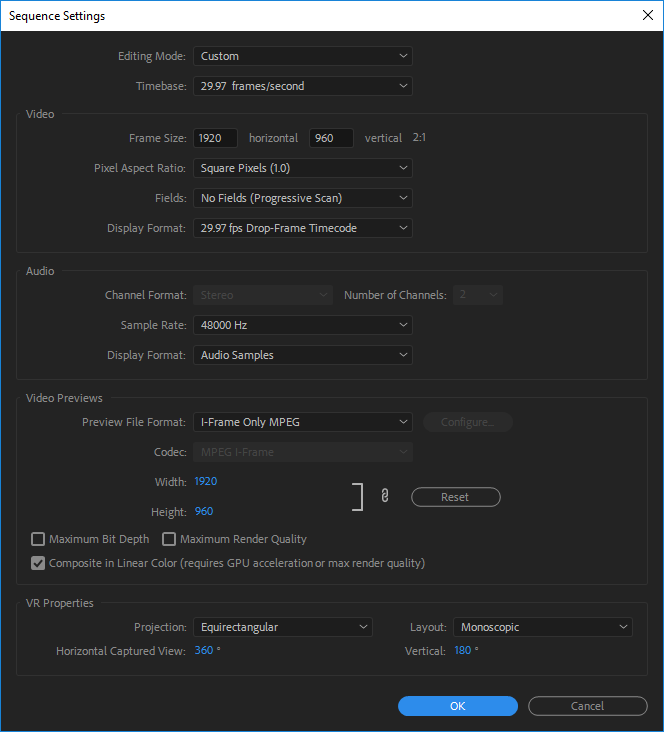
Note your Sequence Preset should be custom 1920x960 @ 30 fps for the Mokacam 360


Based on Support for VR Workflows

VR sync as above then
Select clips
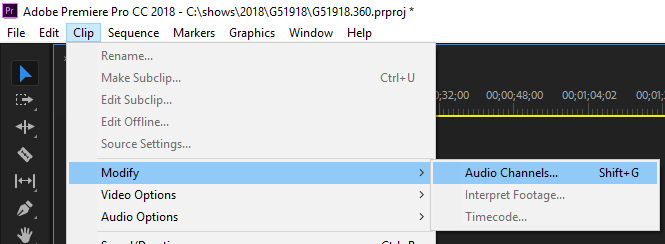
Clip->Modify->Audio Channels (Shift+G)


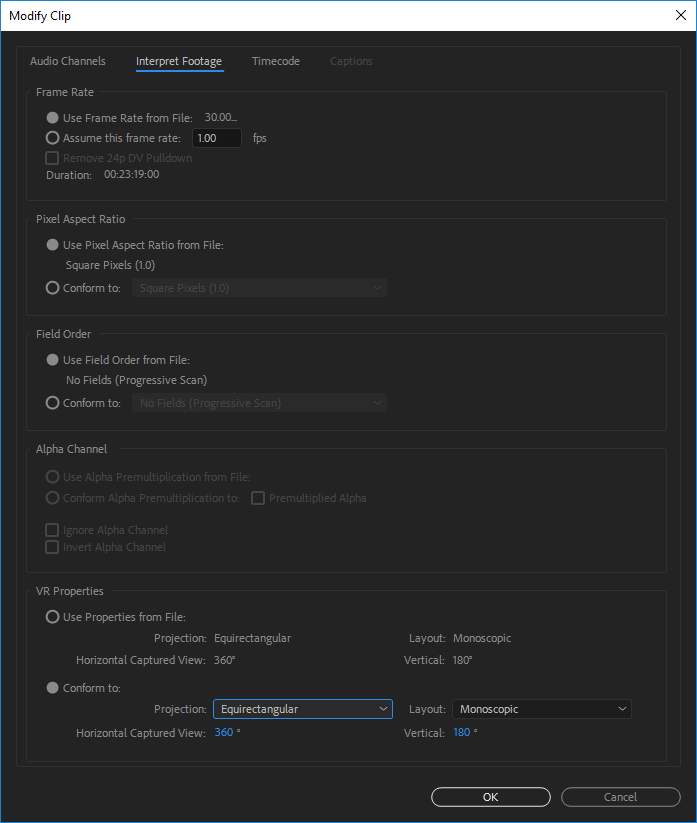
Goto Interpret Footage tab and set options like this


Same with Sequence -> Sequence Settings


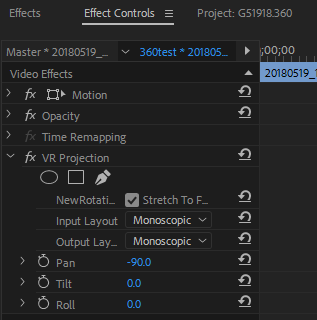
To rotate the picture to where the front of the camera was pointing add the VR Projection effect to your clips and pan -90 degrees


Make other adjustments as needed to center and align default view on subject.

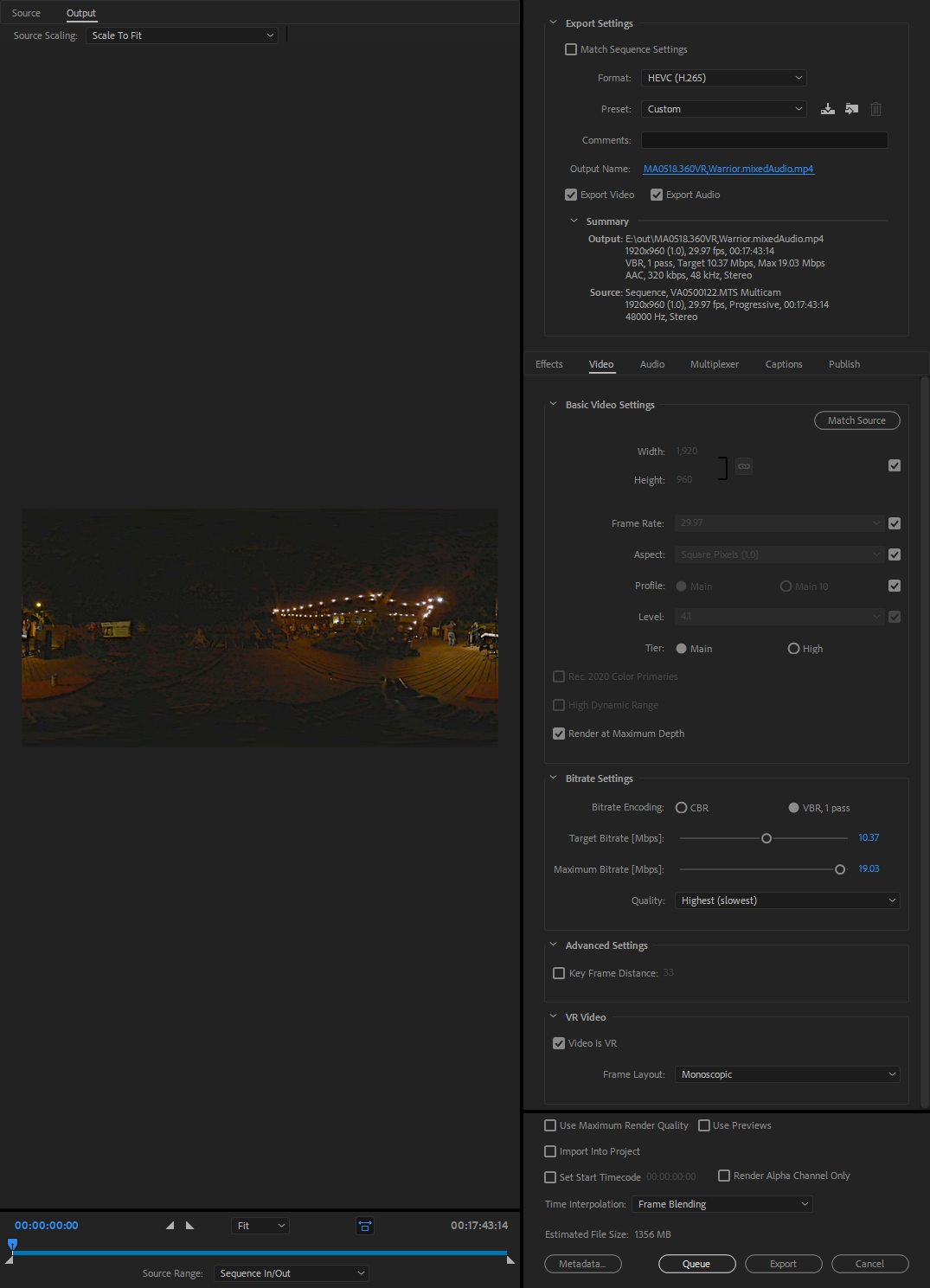
Export settings should be like


Again this final rendering is very slow. The 11 minute video above took about 8 hours to render.

How about pictures

As stated above pictures are 3008 by 1504 which is between 2K and 4K.  Pictures seem to require that conversion step as well. Here is a raw picture

And the converted picture.

You will notice neither seems to be viewing as a 360 picture. For that you have to upload the converted picture to a site like Flikr. Click here to see the converted and the raw pictures on Flikr.